Configuration
The Volt4 configuration is used by clients that want to connect to a Volt4 and access resources or services.
It contains all the information necessary for a client to identify and locate the Volt4 management API and establish a connection.
The full definition of the Volt4 configuration is show in the Appendix below.
Note that the client will also need to supply some credentials in order to identify itself to the Volt. This is described in Volt Connection.
The Volt4 configuration does not contain any sensitive information that may compromise its security. It is safe to distribute the Volt4 configuration, either publicly or only to those you would like to connect to your Volt. Just because somebody possesses your Volt4 configuration does not mean they can access the Volt.
Obtaining a Volt4 configuration
There are several methods of obtaining the configuration document for a given Volt.
DID registry
If you have the DID of the Volt4 you resolve it using a DID registry and obtain the Volt4 configuration.
Out of band
A likely scenario is that you will obtain a Volt4 configuration via some out-of-band means such as email.
If Alice is happy for Bob to connect to her Volt4 she will email Bob her DID or Volt4 configuration.
fusebox
The easiest option if you are owner of the Volt4 is to use the fusebox application. On the main Volt4 screen there is a ‘configuration’ field in the right-hand side bar - see the image below.
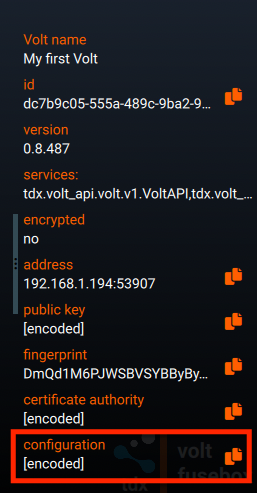
If you click on the ‘copy’ icon at the right-hand edge the Volt4 configuration will be copied to the clipboard.
Command line
Another method of obtaining a Volt4 configuration is via the command line interface. The config command will list all the configured Volts:
volt configOnce you know the id of the Volt, you can obtain the full Volt4 configuration by specifying the id in the config command:
volt config <volt id or alias>If the Volt4 has an alias, you can use that instead of the id:
volt config @<alias>Remote discovery
All Relay Volt connections will implement and expose the tdx.api.relay.v1.RelayAPI service. The endpoint
GetVoltEndpoint can be used to list all Volts that the currently authenticated client has access to.
Examples
A minimal example of a Volt4 configuration is shown below.
{ "id": "did:volt:4801dd12-410d-46d4-84f8-efb0ba609085", "address": "192.168.1.195:52991", "ca_pem": "-----BEGIN CERTIFICATE-----\nMIIB6DCCAZqgAwIBAgIESumM1TAFBgMrZXAwejELMAkGA1UEBhMCR0IxFDASBgNV\nBAcMC1NvdXRoYW1wdG9uMRowGAYDVQQKDBFucXVpcmluZ01pbmRzIEx0ZDE5MDcG\nA1UEAwwwY2EuZGlkOnZvbHQ6NDgwMWRkMTItNDEwZC00NmQ0LTg0ZjgtZWZiMGJh\nNjA5MDg1MB4XDTI0MDgwODA1NDU1OVoXDTI1MDgwODA1NDYwMFowejELMAkGA1UE\nBhMCR0IxFDASBgNVBAcMC1NvdXRoYW1wdG9uMRowGAYDVQQKDBFucXVpcmluZ01p\nbmRzIEx0ZDE5MDcGA1UEAwwwY2EuZGlkOnZvbHQ6NDgwMWRkMTItNDEwZC00NmQ0\nLTg0ZjgtZWZiMGJhNjA5MDg1MCowBQYDK2VwAyEA4Y+OuHQWe2P36Vh/8NptLxBe\nxYPO3swzJUGSO43NYD6jQjBAMA8GA1UdEwEB/wQFMAMBAf8wDgYDVR0PAQH/BAQD\nAgEGMB0GA1UdDgQWBBR/nhaQma18xACBAFTD9qIKoFI/QDAFBgMrZXADQQCV3t2S\nGOTHeRte0RvDXbI7f8mLdUFTCXoyaBEOdQoNPghsEV9LzOKQZ+XKQd9S3EoZRcg9\nOlxd098oM4Z0auwN\n-----END CERTIFICATE-----\n"}Property description
In addition to the JSONSchema given in the Appendix, the properties contained in the Volt4 configuration are described below.
Depending on the scenario, some of the properties may not be applicable and can be omitted.
Properties marked [required] are applicable in all scenarios.
id [required]
The Volt decentralised identifier (DID).
This property must be present in the Volt4 configuration.
display_name
The human-readable display name of the Volt. This is non-unique, and is only for reference purposes, i.e. it is not required in order to be able to connect to the Volt.
address
The address at which the Volt4 is running. This will be in the form of host:port, where host can be either an IP address or a DNS resolvable domain name.
ca_pem [required]
The PEM encoded signing certificate used by the Volt. This must be present in the Volt4 configuration and is used to encrypt all communication with the Volt.
public_key
The public key of the Volt. This is useful for identifying the Volt4 but is not required in the Volt4 configuration in order to be able to connect to the Volt4 (it can be inferred from the signing certificate).
Appendix
Volt configuration definition
The JSONSchema describing the Volt4 configuration is as follows:
{ "$schema": "https://json-schema.org/draft/2019-09/schema", "$id": "https://tdxvolt.com/schemas/volt-configuration", "type": "object", "title": "Volt configuration schema", "required": ["id", "ca_pem"], "properties": { "id": { "type": "string", "title": "The id of the Volt.", "examples": ["1947660b-fbc0-4345-aec7-03b147d4e417"] }, "display_name": { "type": "string", "title": "A human-readable name of the Volt.", "examples": ["macBook (intel)"] }, "address": { "type": "string", "title": "The address that can be used to connect to the Volt within the local network.", "examples": ["192.168.1.69:50908"] }, "public_key": { "type": "string", "title": "The Volt public key, in PEM format. This is optional and will be inferred from the ca_pem.", "examples": [ "-----BEGIN PUBLIC KEY-----\nMCowBQYDK2VwAyEA4Y+OuHQWe2P36Vh/8NptLxBexYPO3swzJUGSO43NYD4=\n-----END PUBLIC KEY-----\n" ] }, "ca_pem": { "type": "string", "title": "The certificate authority used by the Volt, in PEM-encoded format.", "examples": [ "-----BEGIN CERTIFICATE-----\nMIIB6DCCAZqgAwIBAgIESumM1TAFBgMrZXAwejELMAkGA1UEBhMCR0IxFDASBgNV\nBAcMC1NvdXRoYW1wdG9uMRowGAYDVQQKDBFucXVpcmluZ01pbmRzIEx0ZDE5MDcG\nA1UEAwwwY2EuZGlkOnZvbHQ6NDgwMWRkMTItNDEwZC00NmQ0LTg0ZjgtZWZiMGJh\nNjA5MDg1MB4XDTI0MDgwODA1NDU1OVoXDTI1MDgwODA1NDYwMFowejELMAkGA1UE\nBhMCR0IxFDASBgNVBAcMC1NvdXRoYW1wdG9uMRowGAYDVQQKDBFucXVpcmluZ01p\nbmRzIEx0ZDE5MDcGA1UEAwwwY2EuZGlkOnZvbHQ6NDgwMWRkMTItNDEwZC00NmQ0\nLTg0ZjgtZWZiMGJhNjA5MDg1MCowBQYDK2VwAyEA4Y+OuHQWe2P36Vh/8NptLxBe\nxYPO3swzJUGSO43NYD6jQjBAMA8GA1UdEwEB/wQFMAMBAf8wDgYDVR0PAQH/BAQD\nAgEGMB0GA1UdDgQWBBR/nhaQma18xACBAFTD9qIKoFI/QDAFBgMrZXADQQCV3t2S\nGOTHeRte0RvDXbI7f8mLdUFTCXoyaBEOdQoNPghsEV9LzOKQZ+XKQd9S3EoZRcg9\nOlxd098oM4Z0auwN\n-----END CERTIFICATE-----\n" ] } }, "examples": [ { "id": "did:volt:4801dd12-410d-46d4-84f8-efb0ba609085", "display_name": "Alice", "address": "192.168.1.195:52991", "http_address": "http://192.168.1.195:52992", "public_key": "-----BEGIN PUBLIC KEY-----\nMCowBQYDK2VwAyEA4Y+OuHQWe2P36Vh/8NptLxBexYPO3swzJUGSO43NYD4=\n-----END PUBLIC KEY-----\n", "ca_pem": "-----BEGIN CERTIFICATE-----\nMIIB6DCCAZqgAwIBAgIESumM1TAFBgMrZXAwejELMAkGA1UEBhMCR0IxFDASBgNV\nBAcMC1NvdXRoYW1wdG9uMRowGAYDVQQKDBFucXVpcmluZ01pbmRzIEx0ZDE5MDcG\nA1UEAwwwY2EuZGlkOnZvbHQ6NDgwMWRkMTItNDEwZC00NmQ0LTg0ZjgtZWZiMGJh\nNjA5MDg1MB4XDTI0MDgwODA1NDU1OVoXDTI1MDgwODA1NDYwMFowejELMAkGA1UE\nBhMCR0IxFDASBgNVBAcMC1NvdXRoYW1wdG9uMRowGAYDVQQKDBFucXVpcmluZ01p\nbmRzIEx0ZDE5MDcGA1UEAwwwY2EuZGlkOnZvbHQ6NDgwMWRkMTItNDEwZC00NmQ0\nLTg0ZjgtZWZiMGJhNjA5MDg1MCowBQYDK2VwAyEA4Y+OuHQWe2P36Vh/8NptLxBe\nxYPO3swzJUGSO43NYD6jQjBAMA8GA1UdEwEB/wQFMAMBAf8wDgYDVR0PAQH/BAQD\nAgEGMB0GA1UdDgQWBBR/nhaQma18xACBAFTD9qIKoFI/QDAFBgMrZXADQQCV3t2S\nGOTHeRte0RvDXbI7f8mLdUFTCXoyaBEOdQoNPghsEV9LzOKQZ+XKQd9S3EoZRcg9\nOlxd098oM4Z0auwN\n-----END CERTIFICATE-----\n" } ]}